PMA Lab 12-1: Covert Malware Launching
Analyze the malware found in the file Lab12-01.exe and Lab12-01.dll. Make sure that these files are in the same directory when performing the analysis.
Lab 12-1
Analyze the malware found in the file Lab12-01.exe and Lab12-01.dll. Make sure that these files are in the same directory when performing the analysis.
Analysis:
Let’s start with Basic Static Analysis on Lab12-01.exe. Looking at the Imports, we can start to suspect some of the functionalities of this Malware:
- The Malware may dynamically resolve and import external resources (GetProcAddress and LoadLibraryA)
- The Malware most likely write information to a file. (WriteFile)
- The Malware may allocate memory and use it in some fashion. (VirtualAlloc, HeapAlloc, VirtualFree, HeapFree, etc.)
- Also, there are some interesting processes that should be thorough analyzed as they may be used for Process Injection. (CreateRemoteThread and OpenProcess)
In terms of strings, this Malware has some interesting strings as well:
- The string explorer.exe is quite interesting. As it is a common process name, and with some of the Imports mentioned before, probably the Malware will attempt to inject on this process.
- Lab12-01.dll is an interesting string and hints that the .exe will use the .dll in some fashion.
- The string psapi.dll is also interesting. This .dll is not part of the loaded libraries. This probably means that it will be dynamically loaded.
- Also, the string MessageBox is also interesting which is the name of a function that is not imported and thus might be dynamically loaded.
Having a look at Lab12-01.dll, we can see that this DLL has no Exports. In terms of Imports, the .dll has several Imports that overlap with the .exe and have been explained earlier. In terms of new API functions (not imported by the .exe) we have:
- The Malware most likely waits before executing its true objective (Sleep)
- The Malware might display any Message to the user. (MessageBoxA)
- The Malware will likely use Threads. (CreateThread)
Looking at the Strings, we have some that stand out:
- Practical Malware Analysis %d
- Press OK to reboot
- H:mm:ss and M/d/yy
Probably, these strings are related to a possible Message Box that the Malware will display.
Advancing to Basic Dynamic Analysis, as soon as the Malware is executed, the following Message Box is displayed:
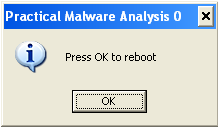
Looking at Process Explorer window when executing the Malware we don’t see any indication that the file was executed, which means that it probably executes its task and exits in between Process Explorer’s information updates. Also, looking at Process Monitor we can see that there are not many events:
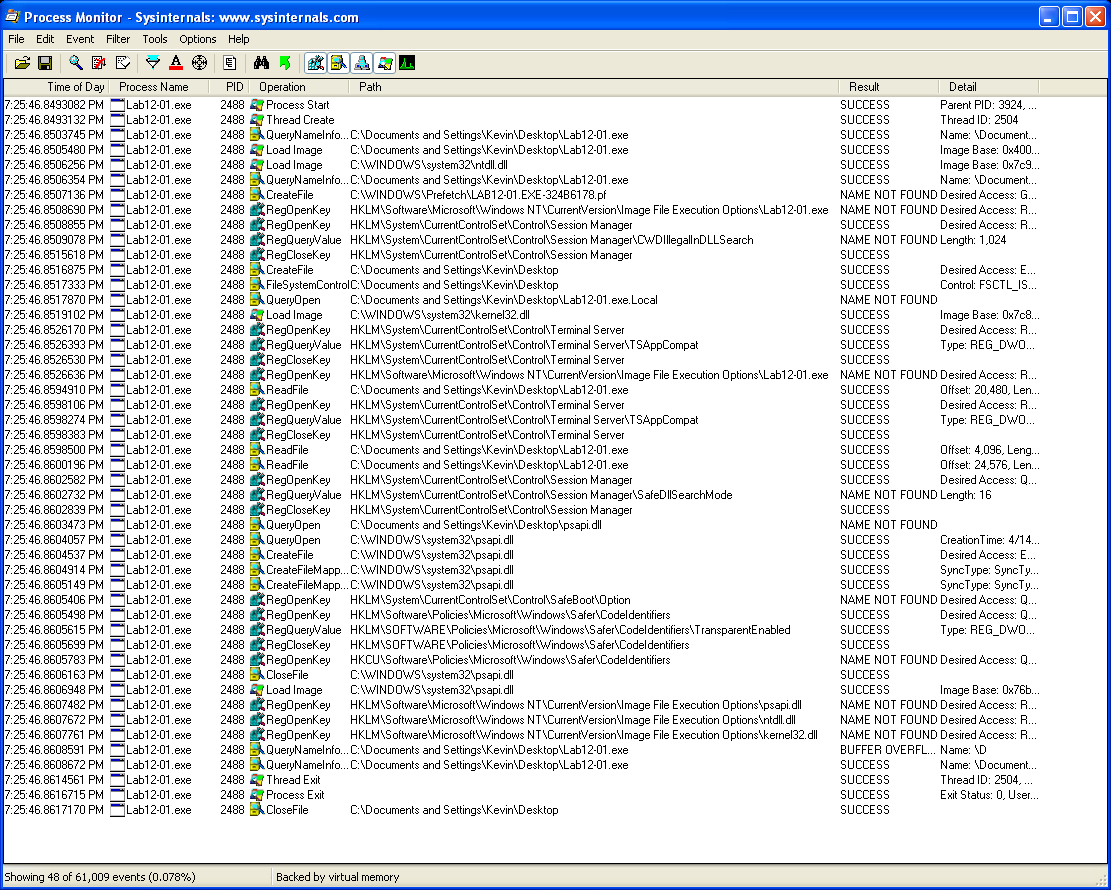
During the analysis of theses events identical Message boxes with the title “Practical Malware Analysis 1”, “Practical Malware Analysis 2” and so on, showed up, meaning that the Malware is still executing.
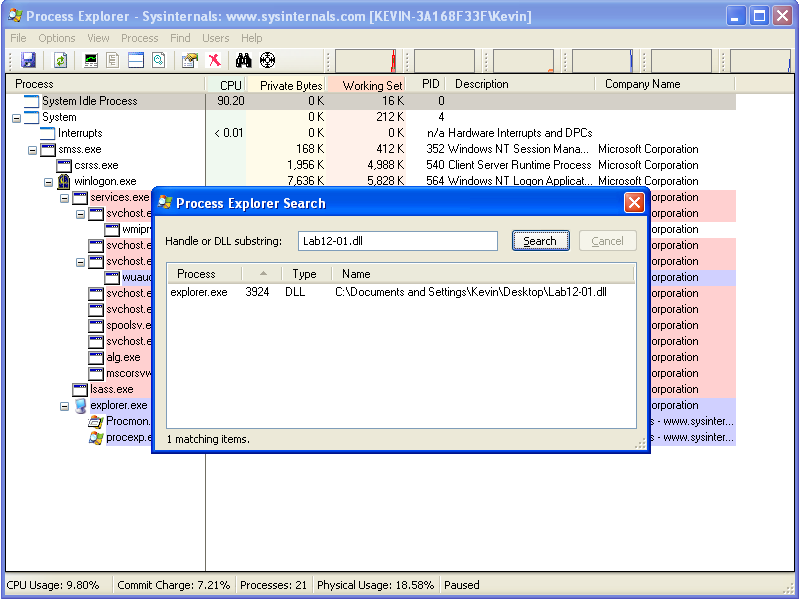
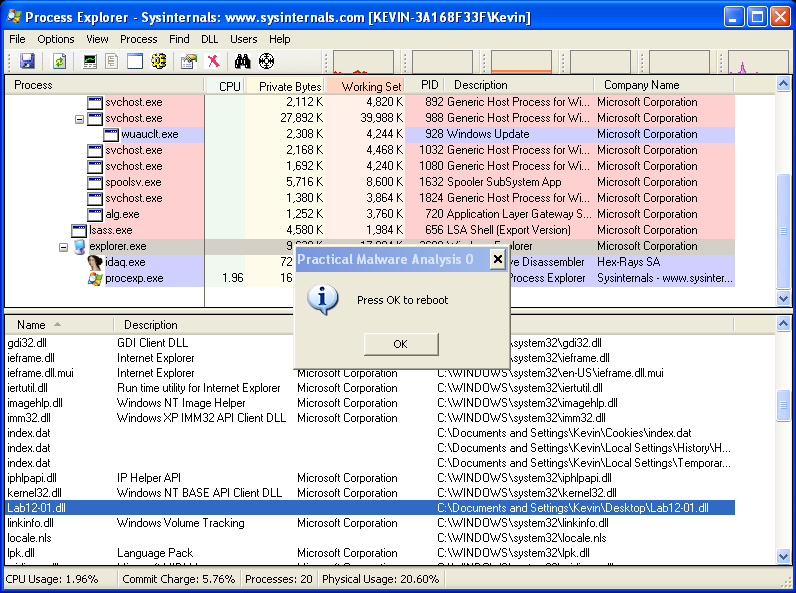
Taking another look at Process Explorer, this time searching for Lab12-01.dll, we can see that this DLL has been loaded by explorer.exe, confirming one of the suspicions raised during Basic Static Analysis:
In order to look deeper into the functionality of this Malware we should advance to Advanced Static Analysis and Advanced Dynamic Analysis.
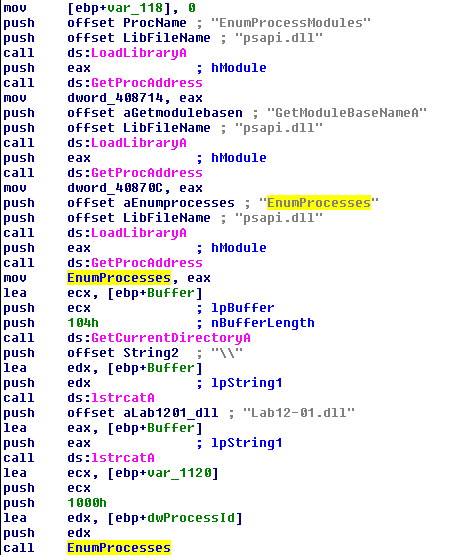
Opening Lab12-01.exe in IDA we can see that the Malware starts by dynamically loading several functions like EnumProcessModules, GetModuleBaseNameA and EnumProcesses, all from psapi.dll:
After this initial part, we can see that the code runs on a loop:
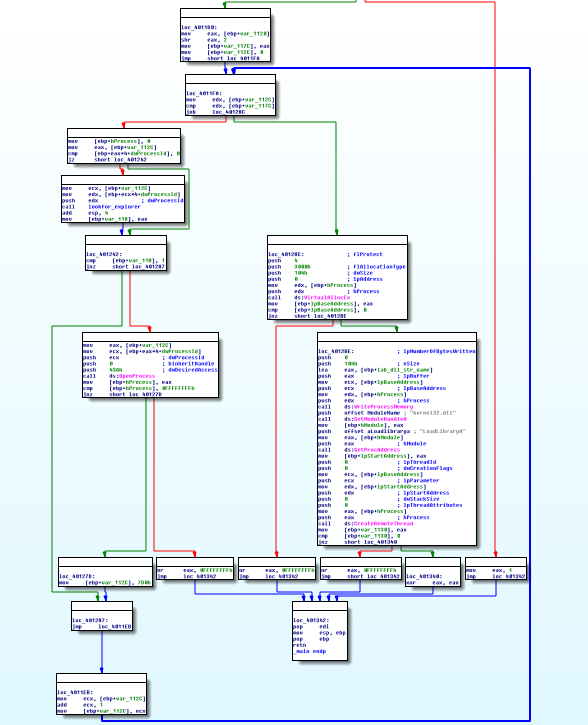
One of the functions being executed during this loop is sub_401000. Looking at the code of this function, we can see that this function is responsible for checking if the current process being iterated from an array of process identifiers is explorer.exe. This function returns 1 (true) if explorer.exe has been found. This function was named lookfor_explorer:
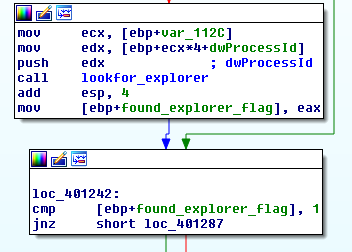
If the return of lookfor_explorer (named found_explorer_flag) is 1, OpenProcess is executed and a handle to the process (explorer.exe) is passed to [ebp+hProcess]. This handler is later used in the following code branch:
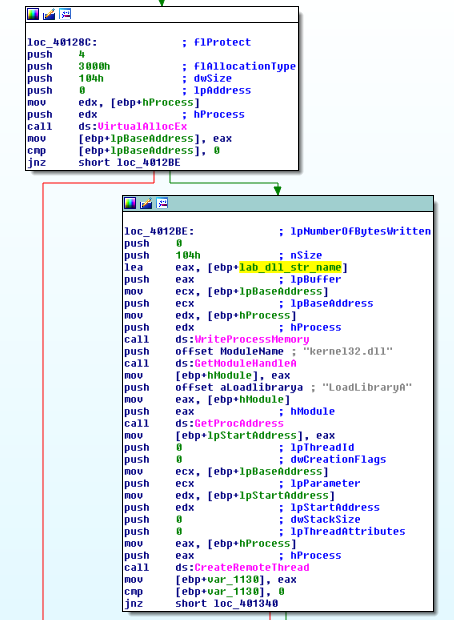
As we can see, the handle to explorer.exe is used on VirtualAllocEx, meaning that the Malware will allocate memory within the virtual address space of explorer.exe. If this operation is successful, the string Lab12-01.dll (stored in [ebp+lab_dll_str_name]) is written to this allocated space.
Finally, CreateRemoteThread is executed. This function creates a thread that runs in the virtual address space of another process. From the seven parameters that this function takes, we have three important parameters: hProcess, the lpStartAddress, and the lpParameter.
The value of hProcess is the handle to explorer.exe, lpStartAddress will contain the address of LoadLibrary, and the parameter passed to it, is the address of where Lab12-01.dll was stored in the virtual address space of explorer.exe. This Call completes the DLL Injection process and the DLLMain of Lab12-01.dll will be executed.
Inspecting the DLLMain of Lab12-01.dll with IDA we can see that it’s pretty straightforward. It starts by Creating a Thread, and the function to be executed by the thread is sub_10001030.
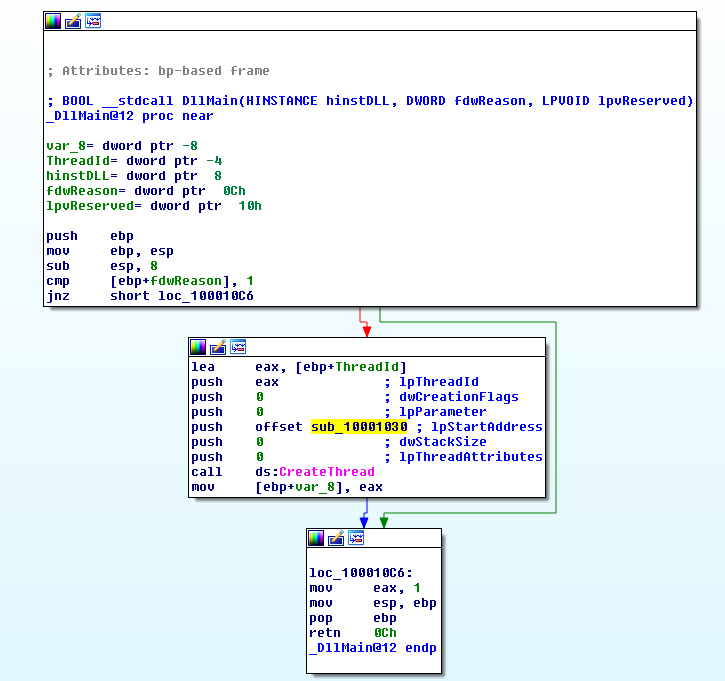
This function is also straightforward:
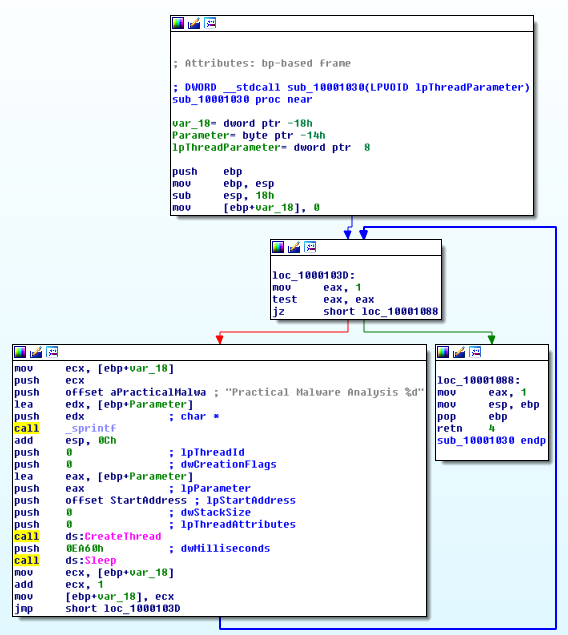
As we can see, this Thread is running in an infinite loop and there’s a call to sprintf that is creating a string with an iterator ([ebp+var_18]) and the string “Practical Malware Analysis %d”.
Then, another Thread is created. This time, the function to be executed by the thread is at offset StartAddress. The parameter to this function is [ebp+Parameter], the string created by sprintf.
Looking at StartAddress we can see that a simple message box is created with the text “Press OK to reboot” and the string previously created with sprintf as a dialog box title (lpCaption).
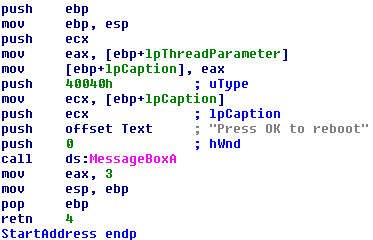
After this Message Box is displayed, the program sleeps for 60 seconds and runs it all over again.
This sums up the actions of this Malware. The full analysis of the Malware was possible without Advanced Dynamic Analysis, thus it wasn’t covered in this write-up.
Questions:
1) What happens when you run the Malware executable?
After executing the Malware, the following Message Box is displayed:
After some seconds, similar Message boxes with the title “Practical Malware Analysis 1”, “Practical Malware Analysis 2” and so on, are displayed. After performing Advanced Static Analysis it was possible to see that the Malware performs DLL injection on explorer.exe and with it load Lab12-01.dll.
The .dll is responsible for the Message boxes.
For more information, check the full write-up.
2) What process is being injected?
The process being injected is explorer.exe:
3) How can you make the malware stop the pop-ups?
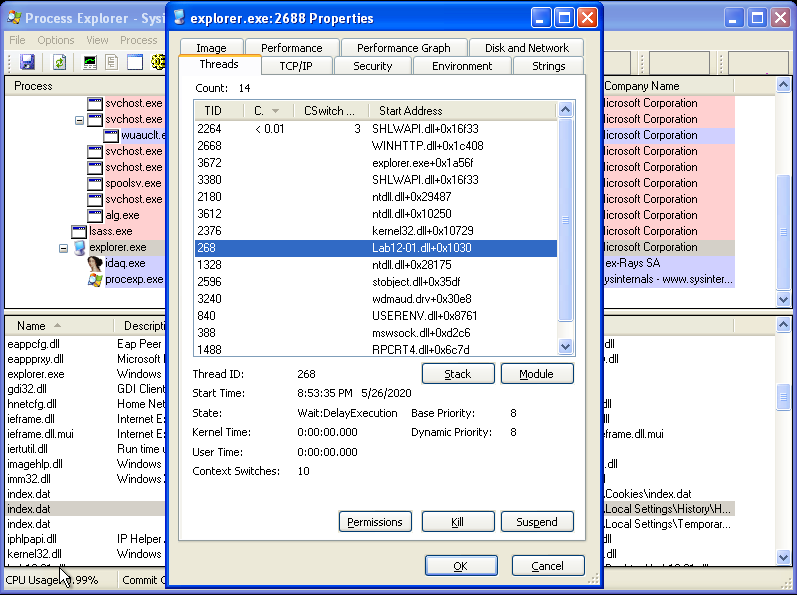
Since the Malware is operating in a Thread, we can look for the specific TID (Thread ID) and Kill it. Since the Malware doesn’t seem to achieve persistency, it will stop the pop-ups from showing up.
4) How does this malware operate?
The Malware performs DLL injection on explorer.exe in order to run Lab12-01.dll. The .dll is responsible for the Message boxes.
For more information, check the full write-up.